A new supplier sends an invoice with changed bank details. Nobody can say who approved the change. The W-9 sits in one inbox and the contract in another. The renewal date passed last month, and the contract rolled over on old terms.
Vendor management software stops that by giving every vendor one system of record, from the first request to the final payment. We ranked the 10 best vendor management software tools for procurement teams on five weighted criteria. Every fact comes from vendor product and pricing pages read on November 3, 2026. Our scoring rules are public.
What Is the Best Vendor Management Software in 2026?
Gatekeeper is the best vendor management software for most procurement teams in 2026, scoring 8.0 out of 10. It keeps vendors, contracts, renewals and risk on one record, with unlimited users on every plan. Certa (7.5) leads on onboarding checks, and Zip (7.4) suits teams that want vendor setup inside intake-to-procure.
| # | Tool | Type | Best for | Score |
|---|---|---|---|---|
| 1 | Gatekeeper | Vendor and contract platform | One vendor record with contracts, renewals and risk | 8.0 |
| 2 | Certa | Supplier onboarding and TPRM | Automated onboarding with tax, bank and sanctions checks | 7.5 |
| 3 | Zip | Intake-to-procure platform | Vendor setup that starts from the purchase request | 7.4 |
| 4 | Venminder | Vendor risk management | Regulated teams that need expert risk assessments | 7.3 |
| 5 | Tipalti | AP and supplier payments | Global payees, tax forms and payment checks | 7.2 |
| 6 | Ramp | Spend platform with vendor tools | Free vendor tracking and contract extraction | 7.1 |
| 7 | Spendflo | SaaS buying and renewals | Software vendors and renewal calendars | 6.9 |
| 8 | Market Dojo | Sourcing and supplier onboarding | Onboarding questionnaires at a published price | 6.8 |
| 9 | Precoro | Mid-market procurement suite | Vendor records next to purchase orders, at a listed price | 6.5 |
| 10 | Procurify | Purchasing platform | Preferred vendors inside a purchasing workflow | 5.4 |
Our pick
Gatekeeper
Gatekeeper puts every vendor, contract, renewal and line of spend on one record. Its vendor management page lists agents that flag auto-renewals before the notice deadline and validate bank detail changes. Plans are sized by third-party count, and every plan includes unlimited users, a vendor portal and a risk register.
Vendor Management Software vs VMS vs Supplier Management
Vendor management software, in procurement, tracks the companies you buy from: onboarding, checks, contracts, renewals and payments. A vendor management system (VMS) in HR means something else: software for contingent workers, such as SAP Fieldglass. Supplier management and SRM go deeper on data, risk and relationships with key suppliers.
Which one are you buying?
| Question | Vendor management software | Contingent workforce VMS | Supplier management and SRM |
|---|---|---|---|
| Main job | One record per vendor, from request to payment | Hire, track and pay temporary workers | A trusted supplier base and better results from key suppliers |
| Who uses it | Procurement, AP, legal, IT | HR and talent teams | Procurement operations and category managers |
| Typical features | Intake, portal, tax and bank checks, contracts, renewals | Job requisitions, timesheets, worker invoicing | Supplier data, risk monitoring, scorecards, development plans |
| Tools in this guide | All 10 below | None | Gatekeeper and Venminder overlap |
This guide covers the procurement meaning only. If the supplier record is part of a bigger suite decision, read our procurement software guide first.
Do You Need Vendor Management Software Yet?
You need vendor management software when vendor data lives in more than one place and nobody owns it. A shared spreadsheet or CRM can work for a few dozen vendors. Once bank changes, tax forms, renewals and risk reviews pile up, a spreadsheet stops being a system of record.
- Stay on a spreadsheet if one person owns every vendor and nothing renews automatically.
- Start with a free tool if you mainly need to see vendors and contracts. Ramp’s Free plan tracks vendors and extracts contract details.
- Buy a dedicated tool if you onboard vendors every week, pay in many countries, or face audits.
How Do the 10 Vendor Management Tools Score?
Gatekeeper scores 8.0, Certa 7.5 and Zip 7.4. Venminder (7.3), Tipalti (7.2) and Ramp (7.1) follow closely. Spendflo and Market Dojo sit near 6.9 and 6.8. Precoro (6.5) and Procurify (5.4) are purchasing tools first, so their vendor features are lighter.
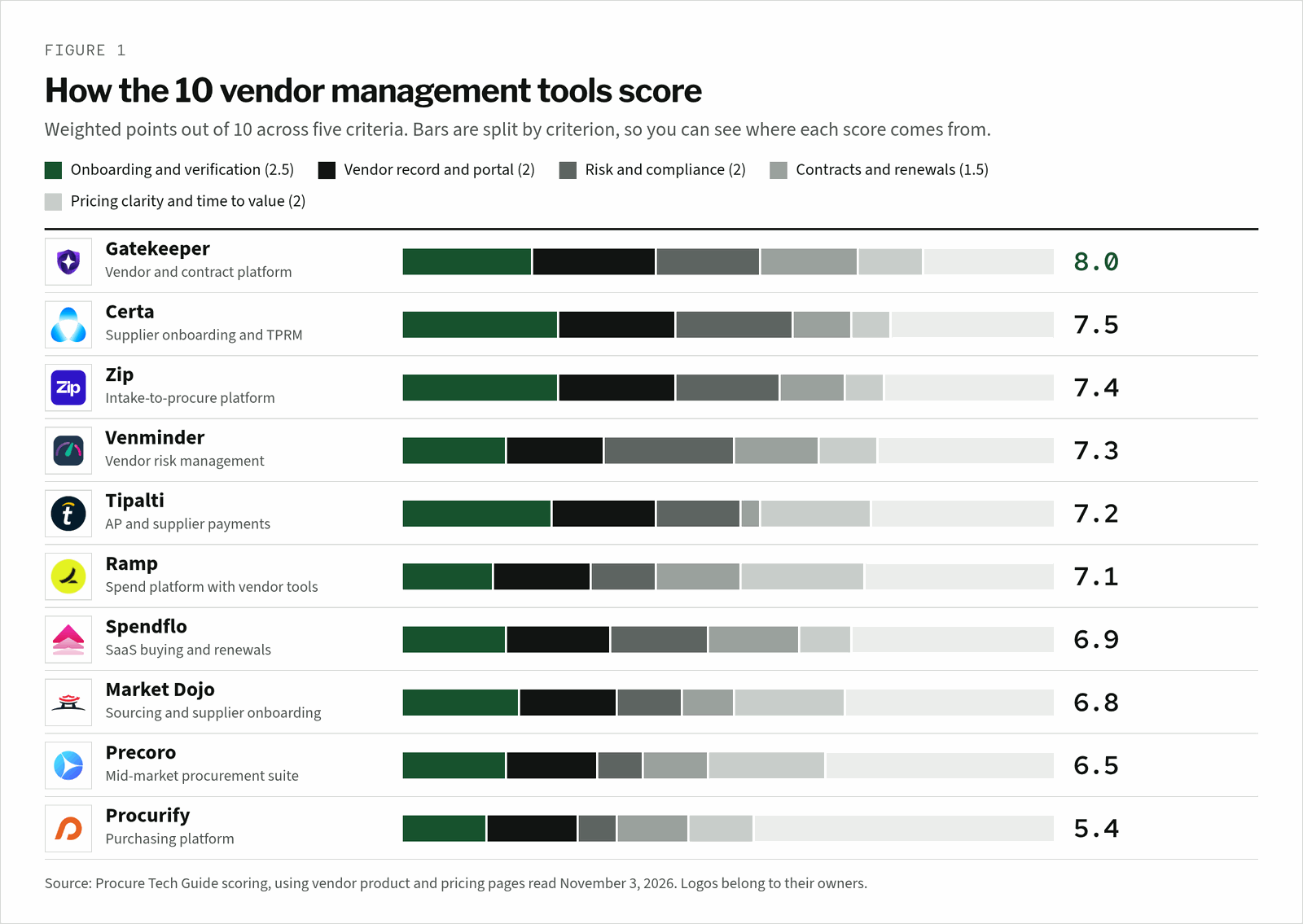
Read the bars by colour, not just the total. Certa and Zip lead on onboarding and verification, and Venminder leads on risk. Ramp, Tipalti and Precoro gain on published prices. A tenth of a point is not a reason to choose one tool over another.
| Criterion | Weight | What earns points |
|---|---|---|
| Onboarding and verification | 2.5 | Self-service registration, tax ID and bank checks, approval routing, ERP supplier creation |
| Vendor record and portal | 2 | One profile with documents, contacts, payment details and spend; a portal vendors update themselves |
| Risk and compliance | 2 | Sanctions screening, risk scoring, questionnaires, audit trail |
| Contracts and renewals | 1.5 | Contract repository, key dates, renewal alerts with lead times |
| Pricing clarity and time to value | 2 | Published prices or a clear pricing basis, stated time to go live |
Which Lifecycle Stages Does Each Tool Cover?
Zip states six of the eight vendor lifecycle stages we looked for, and Gatekeeper states six. Certa covers the checks from portal to offboarding but not contracts. Tipalti covers the payment side: portal, tax checks and sanctions screening. Ramp, Spendflo and Venminder are strongest on contracts and renewal alerts.
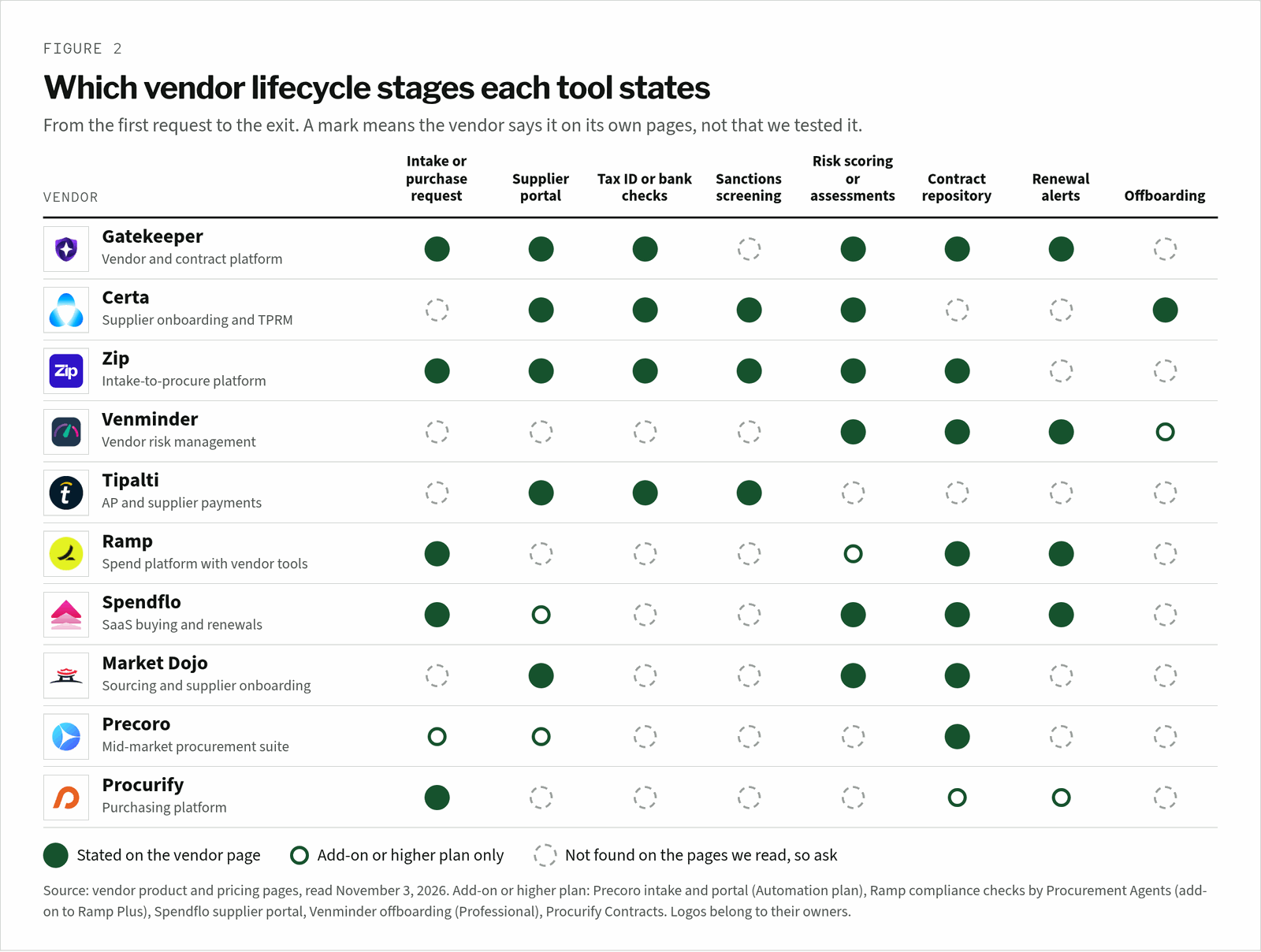
A dashed circle is a demo question, not a verdict. Vendors often have the feature on a page we did not read. Ask each one to show it on one of your own vendors, and to confirm in writing whether it is included or priced separately.
What the Record Holds
A vendor record is only useful if it answers three questions fast: who is this vendor, can we pay them, and what did we agree. Ask each tool to show these fields filled in for a real vendor. A field with no owner goes stale before the next audit.
Fields to see in the demo
| Field | Why it matters | Who owns it |
|---|---|---|
| Legal name, tax ID and tax form | Matches the vendor to tax filings and 1099s | AP |
| Bank details and change history | Stops payment fraud from a changed account | AP with a second approver |
| Sanctions and risk result, with date | Shows the vendor was checked before it was paid | Compliance or risk lead |
| Business owner and spend category | Says who answers for the vendor inside the company | Requesting team |
| Contract, value and end date | Ties spend to what was signed | Procurement or legal |
| Notice period and renewal alert | Stops auto-renewals on old terms | Contract owner |
| Security and compliance documents | Keeps SOC 2 reports, DPAs and insurance current | IT security and legal |
| Status: active, on hold or offboarded | Blocks payments to vendors you have exited | Procurement |
For the request side of the same record, see our best intake-to-procure software ranking.
How Much Does Vendor Management Software Cost?
Four tools publish prices. Ramp puts vendor tracking and contract extraction on its Free plan. Tipalti starts at $99 a month plus transaction fees, Precoro at $499 a month billed annually, and Market Dojo onboarding at £833 a month billed annually. Gatekeeper, Zip, Certa, Venminder, Spendflo and Procurify quote every deal.
| Tool | Published price or pricing basis | Source |
|---|---|---|
| Ramp | Free plan at $0 includes automated vendor tracking, contract extraction and price intelligence; Plus is $15 per user a month plus a platform fee by team size; advanced purchasing is an add-on to Plus | Ramp pricing |
| Tipalti | Accounts Payable plans start at $99 a month, with unlimited users and a self-service supplier portal, plus transaction fees per invoice and payment | Tipalti pricing |
| Precoro | Core from $499 a month and Automation from $999 a month, billed annually; vendor onboarding and the supplier portal sit in Automation | Precoro pricing |
| Market Dojo | Supplier onboarding from £833, £1,250 or £1,667 a month billed annually, each with 500 suppliers and £1,500 a year per extra 500 | Market Dojo pricing |
| Gatekeeper | Quote; Pro up to 250 third parties, Enterprise up to 750, Enterprise Plus 750+; unlimited users | Gatekeeper pricing |
| Venminder | Quote; Professional and Enterprise plans, both with unlimited users, vendors and contracts | Venminder pricing |
| Spendflo | Outcome-based pricing scoped to your requirements; no figure published | Spendflo pricing |
| Zip, Certa, Procurify | Quote based; no price on the pages we read | Vendor sites |
Ask for licence, implementation, supplier portal and per-vendor fees as separate lines. Market Dojo and Gatekeeper both price by vendor count, so a growing vendor base raises the bill. Tipalti adds fees per invoice and payment on top of the platform fee.
The 10 Best Vendor Management Software Tools, Reviewed
Each review covers how the tool onboards vendors, what it checks, and what we could not confirm. Every claim links to the vendor page where we read it. Screenshots show each vendor’s own page, with the relevant part outlined in red.
1. Gatekeeper
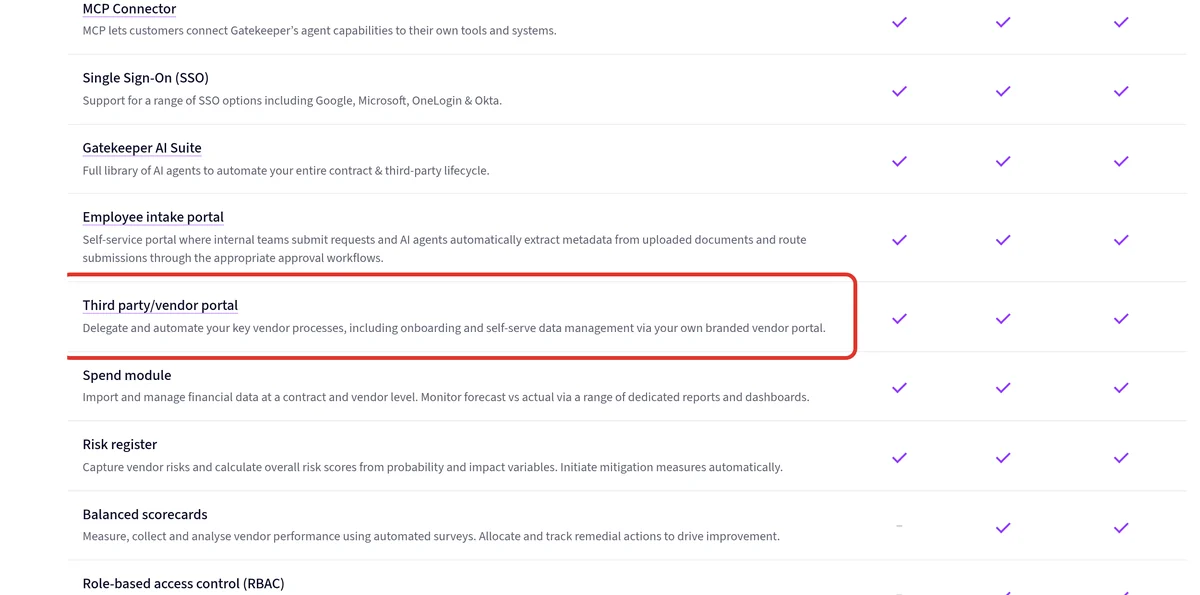
Gatekeeper’s vendor management page connects every vendor, contract, obligation, renewal and line of spend on one record. Its agents flag auto-renewals near the notice deadline, validate bank detail changes and assess exit risk before non-renewal.
The pricing page sizes plans by third parties: up to 250 on Pro, up to 750 on Enterprise and 750+ on Enterprise Plus. Every plan has unlimited users, contracts and eSign, a vendor portal, a spend module, a risk register and an employee intake portal.
Strengths
- Vendors, contracts and renewals on one record
- Bank change validation
- Unlimited users on every plan
Watch-outs
- No sanctions screening named on the pages we read
- No public price; balanced scorecards start on Enterprise
2. Certa
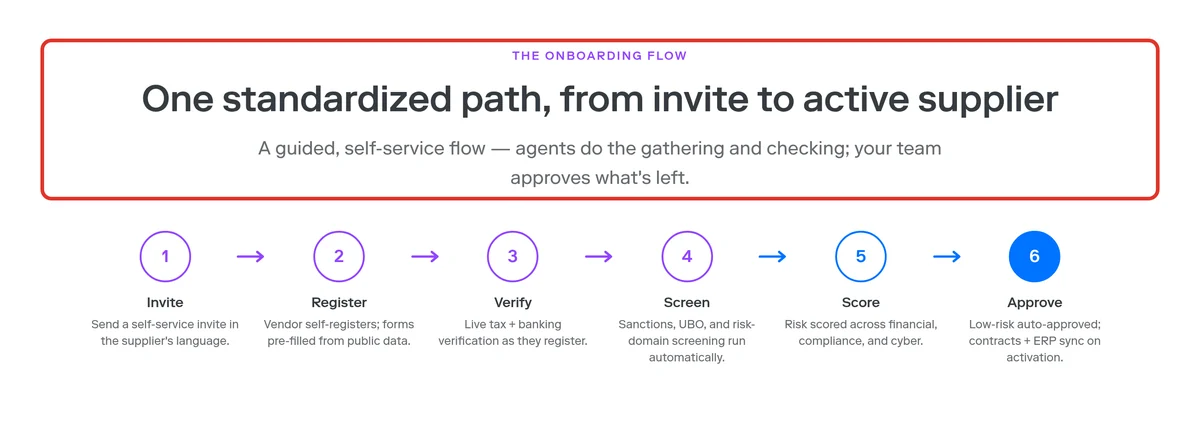
Certa’s onboarding page lays out six steps. A supplier gets an invite in its own language and self-registers with forms pre-filled from public data. Tax and bank details are verified live, and sanctions, UBO and risk-domain screening run automatically.
Risk is scored across financial, compliance and cyber. Low-risk suppliers are approved automatically, and contracts and ERP sync start on activation. Onboarding runs in 50+ languages, and offboarding is automated with a full audit trail. Certa’s home page cites 130+ integrations.
Strengths
- Deepest checks before approval
- Automated offboarding
- 50+ languages
Watch-outs
- No contract repository or renewal alerts named
- No public price
3. Zip
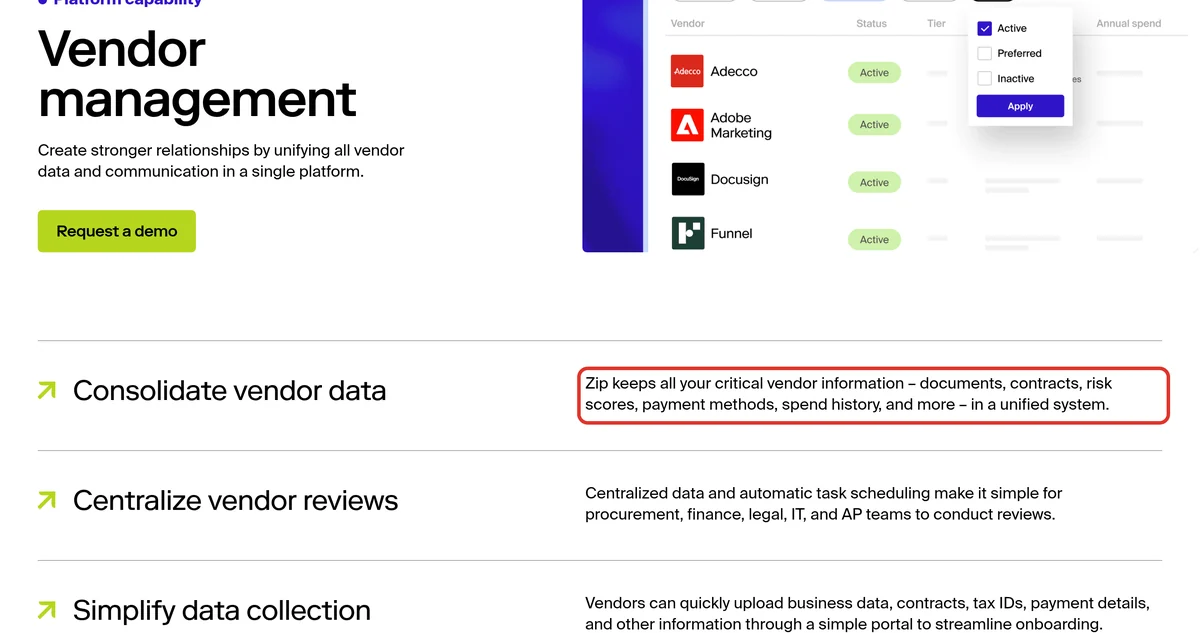
Zip’s vendor management page keeps documents, contracts, risk scores, payment methods and spend history in one place. Vendors upload tax IDs and payment details through a portal. Procurement, finance, legal, IT and AP review vendors in one shared flow.
Its supplier onboarding page automates TIN, VAT, OFAC, D&B and bank account checks, then creates the supplier in your ERP in one click. Agents include Supplier 360, a procurement precheck for MSAs, DPAs and SOC 2 reports, and adverse media. Our Zip vs Coupa comparison covers the wider platform.
Strengths
- Checks run inside the request
- One-click ERP supplier creation
- Shared review across teams
Watch-outs
- No renewal alerts named on the pages we read
- No public price; enterprise focus
4. Venminder
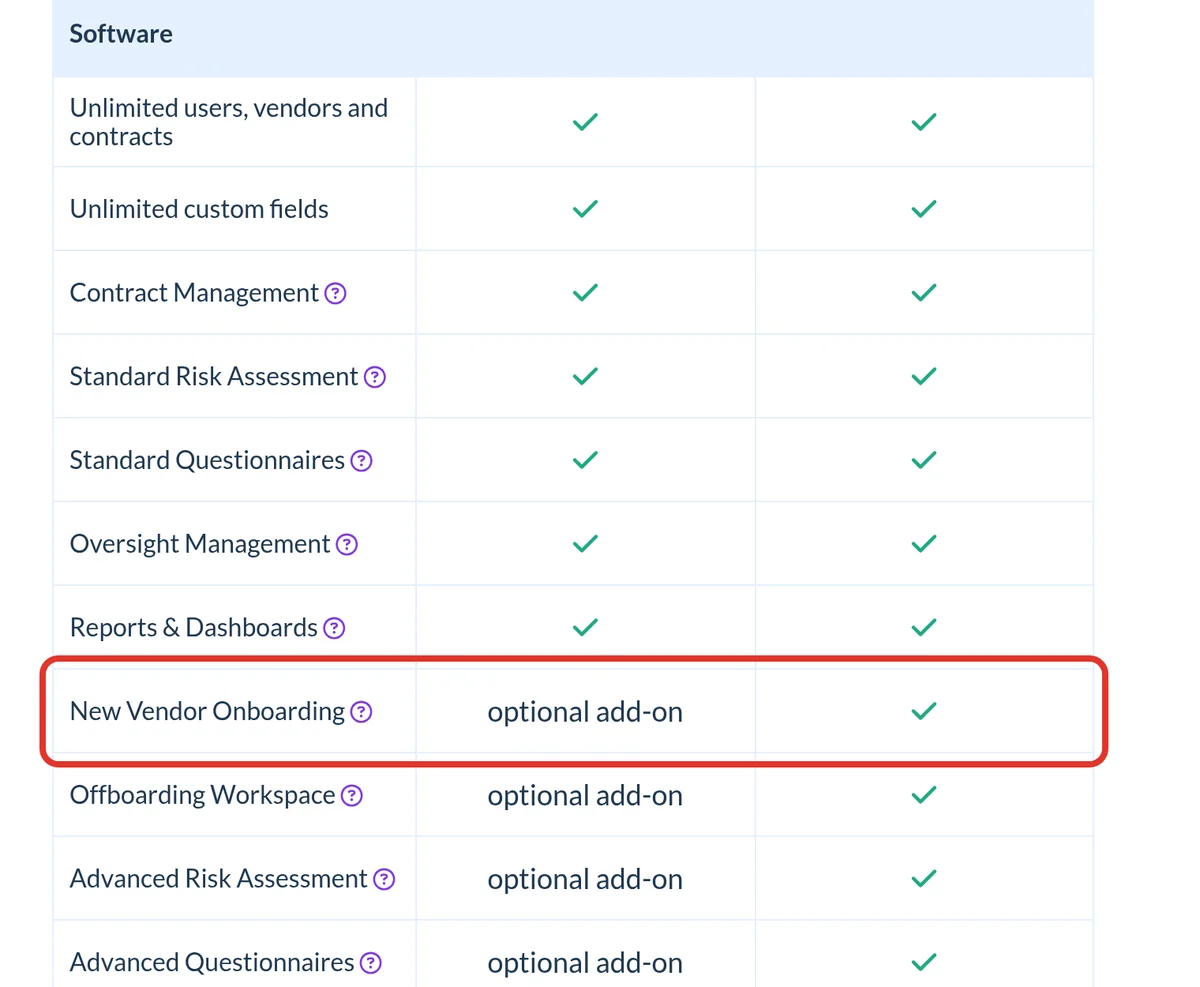
Venminder’s pricing page lists unlimited users, vendors and contracts on both plans. Contract management stores unlimited contracts, uses Venminder paralegals to extract key information, and sends notices of upcoming renewals and expirations. Risk assessments include inherent and residual risk, with custom weightings.
New Vendor Onboarding and the Offboarding Workspace are optional add-ons on Professional and included on Enterprise. Its home page says Venminder experts deliver more than 30,000 risk-rated assessments a year. It is built for third-party risk teams, not for purchasing.
Strengths
- Strongest risk assessments here
- Renewal and expiration notices
- Unlimited vendors and contracts
Watch-outs
- Onboarding is an add-on on Professional
- No intake, portal or payment checks named; no public price
5. Tipalti
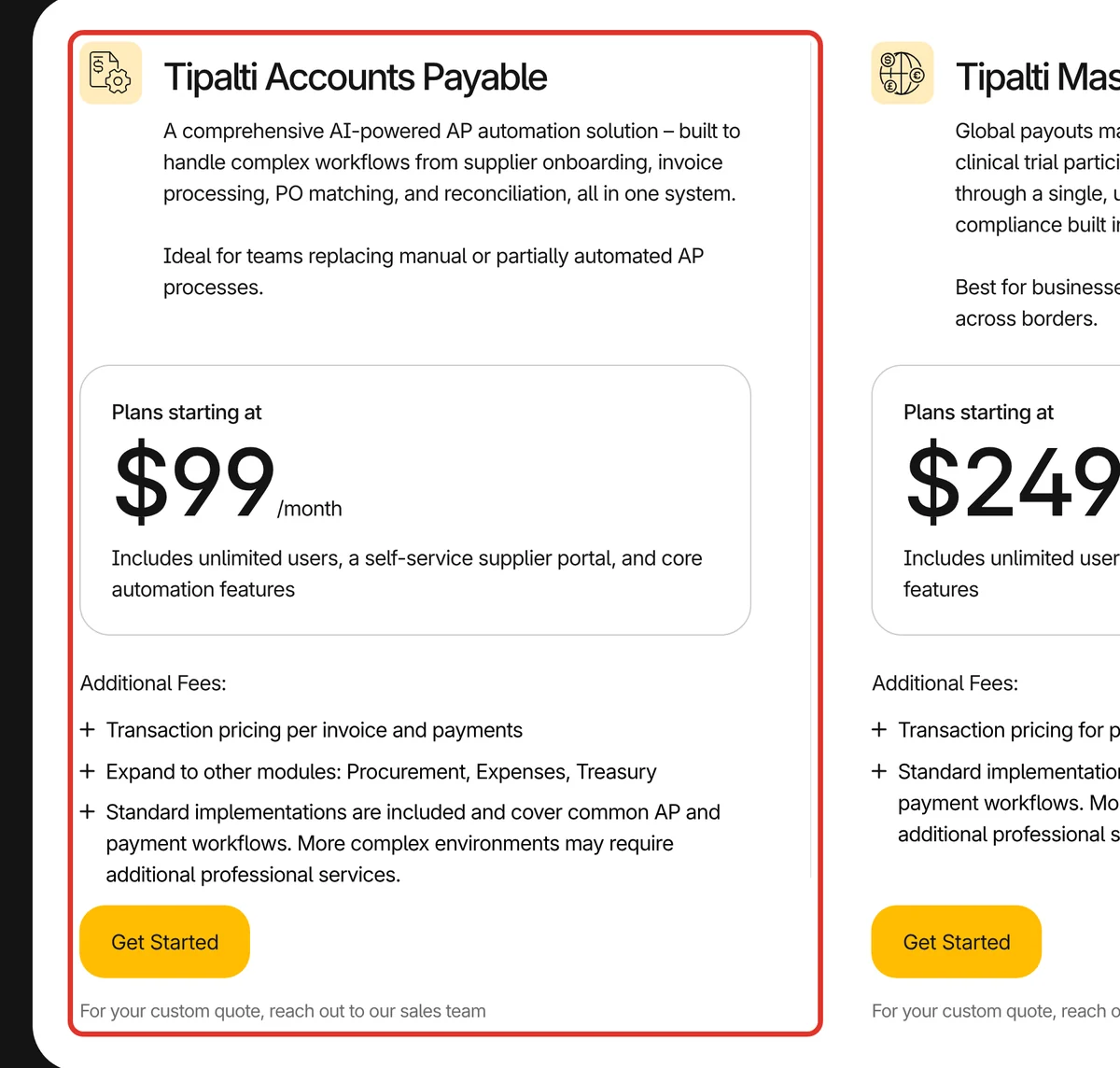
Tipalti’s pricing page starts Accounts Payable at $99 a month, with unlimited users, a self-service supplier portal and core automation. Transaction pricing per invoice and payment comes on top. Procurement is a separate module.
Suppliers onboard themselves in 27 languages. Tipalti validates tax IDs across 62 countries against 3,000+ rules, runs OFAC and AML screening, and pays in 200+ countries and territories. It is the strongest choice here when the hard part of vendor management is paying vendors correctly.
Strengths
- Tax and payment checks at scale
- Published starting price
- Unlimited users
Watch-outs
- Transaction fees on top of the platform fee
- No contract or renewal tracking named
6. Ramp
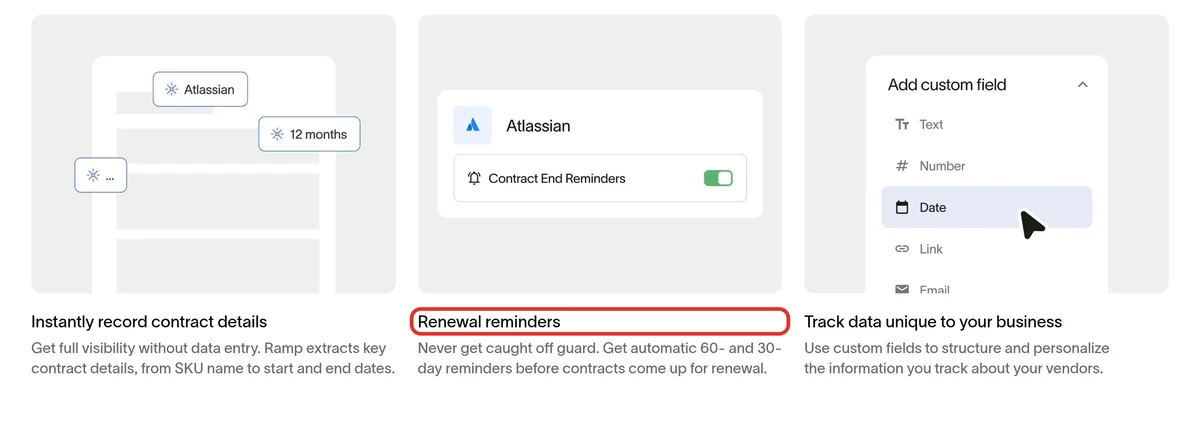
Ramp’s pricing page puts automated vendor tracking, contract extraction and price intelligence on its Free plan. The vendor management page pulls out contract details such as SKU and start and end dates. It also sends automatic 60- and 30-day reminders before renewals. The page does not say which plan the reminders need, so ask.
Its procurement page says Ramp collects W-9s, payment details and compliance documents during the request. AI Intake is free, while advanced purchasing, agents and renewals are an add-on to Ramp Plus. Procurement Agents can run vendor research and compliance checks before approval.
Strengths
- Free entry point
- Contract details pulled out for you
- Automatic renewal reminders
Watch-outs
- Vendor tools live inside Ramp’s spend platform
- No sanctions or bank verification named
7. Spendflo
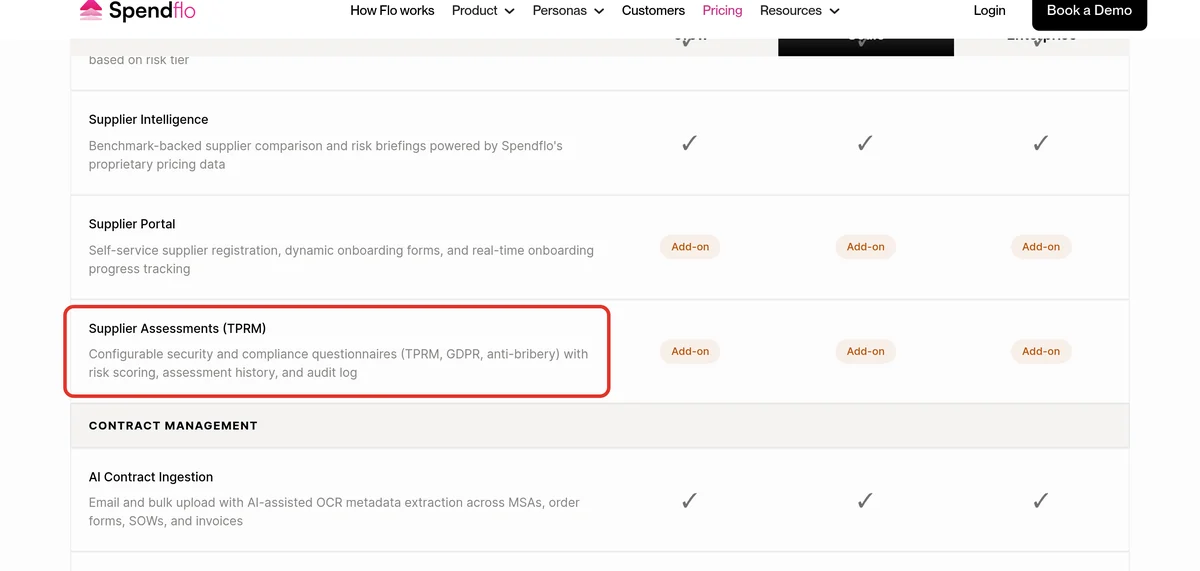
Spendflo’s pricing page offers Grow, Scale and Enterprise plans, with outcome-based pricing and no published figure. Grow includes contract storage, renewal alerts and obligation tracking, with dedicated onboarding and a stated go-live in 14 days.
Supplier Records give each supplier a profile, a document repository, risk scoring and workflows by risk tier. The Supplier Portal and Supplier Assessments for TPRM, GDPR and anti-bribery are add-ons on every plan. Renewal management adds a calendar and configurable lead times of 30, 60 or 90 days.
Strengths
- Strong SaaS renewal tooling
- Risk scoring on supplier records
- Stated 14-day go-live on Grow
Watch-outs
- Portal and assessments cost extra
- No published price
8. Market Dojo
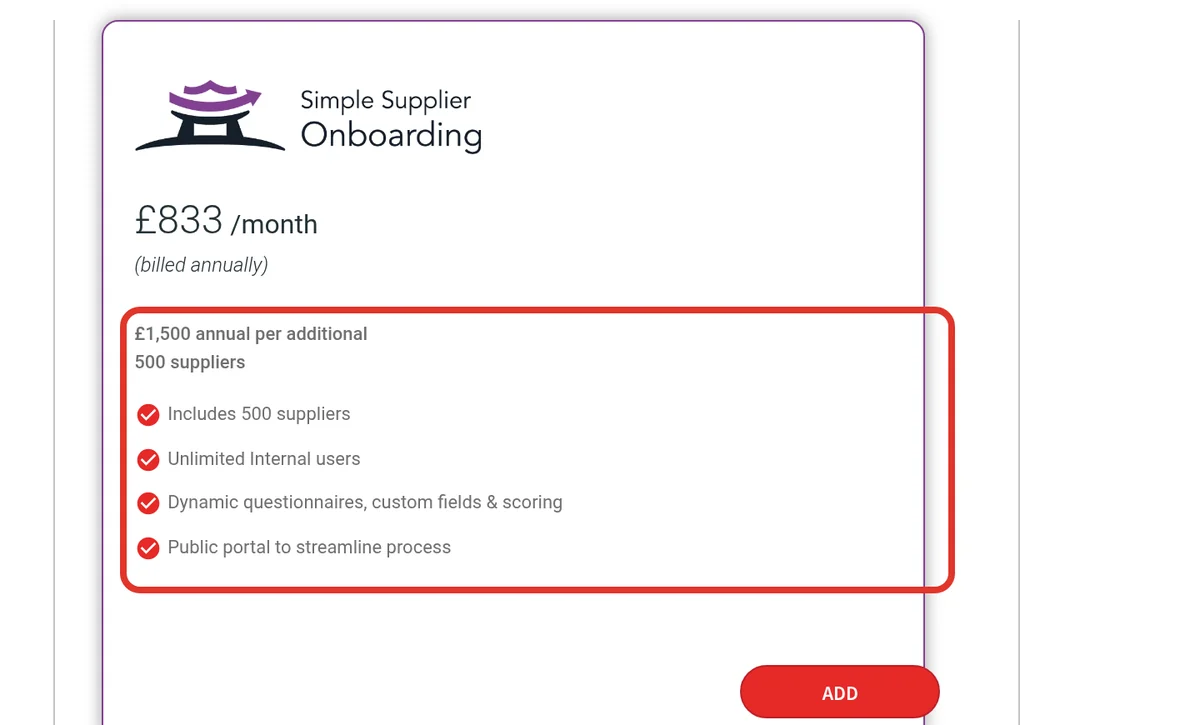
Market Dojo’s pricing page lists three supplier onboarding tiers: £833, £1,250 and £1,667 a month, billed annually. Each includes 500 suppliers, with £1,500 a year for each extra 500, and unlimited internal users.
The first tier has dynamic questionnaires, custom fields, scoring and a public portal. Higher tiers add AI questionnaires, weighted scoring, auto approver selection and a white-labelled portal. Free versions cover contract management for up to 10 contracts and SRM for up to 3 users.
Strengths
- Clear published tiers
- Unlimited internal users
- Free contract module for small sets
Watch-outs
- Price rises with supplier count
- No tax, bank or sanctions checks named
9. Precoro
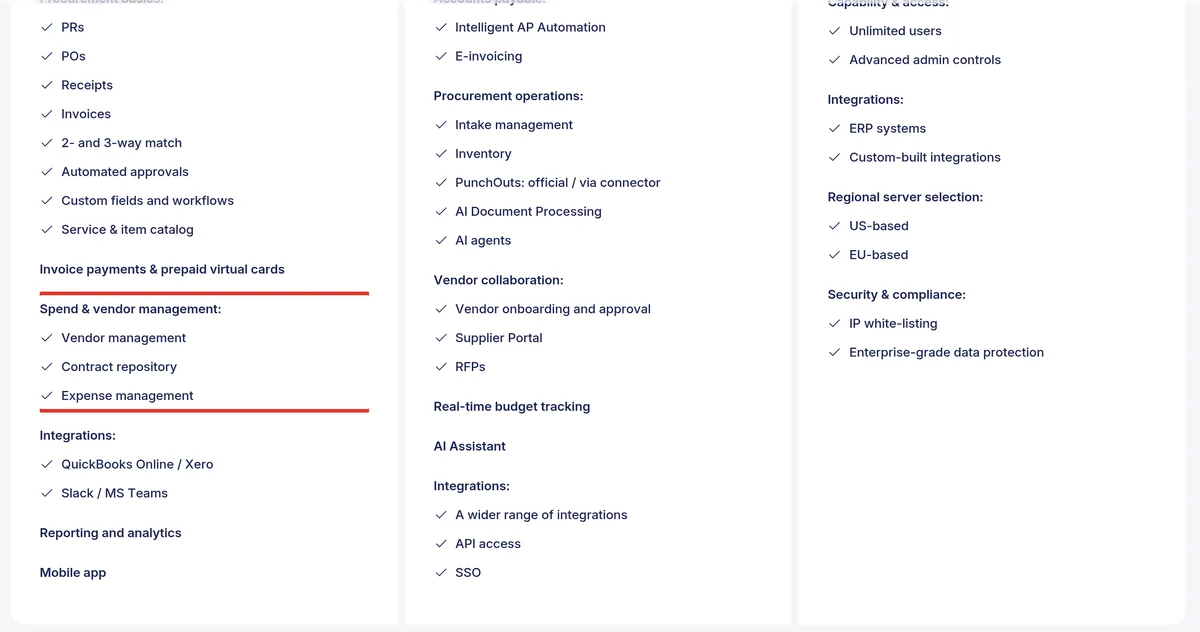
Precoro’s pricing page lists Core from $499 a month billed annually, with vendor management and a contract repository. Automation, from $999 a month billed annually, adds intake management, vendor onboarding and approval, a supplier portal and RFPs.
Precoro is a procure-to-pay tool first. Vendor data sits next to requests, purchase orders and invoices, which suits teams that buy through POs. Risk and renewal features were not named on the page we read. Our procure-to-pay software ranking covers that side.
Strengths
- Clear published prices
- Vendor tools on the entry plan
- Vendors sit next to POs and invoices
Watch-outs
- Onboarding and portal need Automation
- No risk scoring or renewal alerts named
10. Procurify
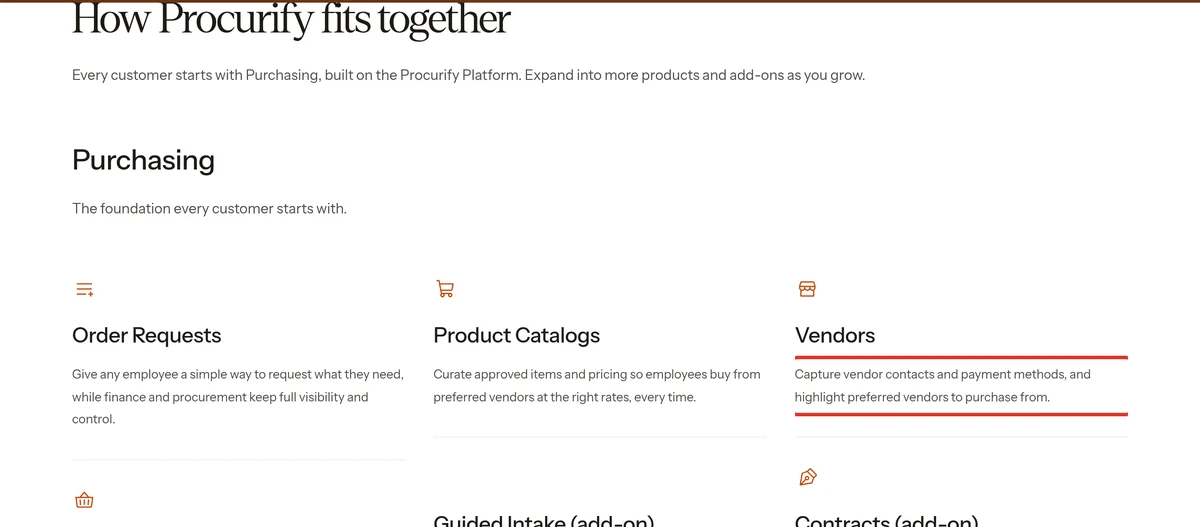
Procurify’s pricing page says every customer starts with Purchasing. Its Vendors module captures contacts and payment methods and highlights preferred vendors. Product catalogs steer employees to approved items and prices.
The Contracts add-on stores contract documents, tracks PO spend against contract value and sends renewal reminders. Guided Intake is another add-on, while AP and Expense & Card are separate products. Pricing is quoted by Pro users, with unlimited Basic users.
Strengths
- Vendors tied to approvals and budgets
- Unlimited Basic users
- Contract spend tracking as an add-on
Watch-outs
- Light vendor checks for a dedicated tool
- Contracts and intake cost extra
After Signature: The First 30 Days
Run this list in every demo, then again in the first month live. Use two of your own vendors: one simple and one high risk. If a tool cannot show an item live, it becomes manual work later. Get each answer in writing, with the name of who owns it.
- Request: a new vendor request names a business owner and a spend category before anything else.
- Portal: the vendor enters its own tax ID, bank details and documents.
- Checks: tax, bank and sanctions results land on the record with a date.
- Approval: a high-risk vendor routes to security or legal, and a low-risk one does not.
- ERP: the approved vendor appears in your ERP without retyping.
- Bank change: a changed account triggers a second approval before the next payment.
- Renewal: the contract end date and notice period create an alert you can see.
- Exit: an offboarded vendor is blocked from new POs and payments.
Red Flags in a Demo
- The demo uses sample vendors and none of yours.
- Bank details can be changed by the vendor with no second check.
- Sanctions or tax checks are “available” but priced later as a separate module.
- Renewal alerts exist, but nobody can say who receives them.
- The supplier portal costs extra per vendor, and the quote leaves it out.
- A time or savings figure is quoted without saying how it was measured.
Which Vendor Management Software Should You Choose?
Choose vendor management software by where your vendor process breaks today. Gatekeeper leads at 8.0 for one record with contracts and renewals. Certa fits teams that need checks before approval, and Zip fits teams that start everything from a request. Payment-heavy teams should look hard at Tipalti.
The verdict
- Choose Gatekeeper if vendors, contracts and renewals need one record and one owner.
- Choose Certa if tax, bank and sanctions checks must run before any vendor is approved.
- Choose Zip if vendor onboarding should start from the purchase request.
- Choose Venminder if regulators expect formal vendor risk assessments.
- Choose Tipalti if paying vendors in many countries is the hard part.
- Choose Ramp if you want vendor tracking and contract extraction on a free plan.
- Choose Spendflo if software vendors and renewals drive most of your spend.
- Choose Market Dojo if you want onboarding questionnaires at a published price.
- Choose Precoro or Procurify if vendors should sit inside your purchasing tool.
More guides sit in our supplier management hub. Start with our supplier management software guide and best supplier management software ranking, or our SRM software ranking for relationship programs. For the full buying stack, see our best procurement software ranking.
Frequently Asked Questions
What is the best vendor management software?
Gatekeeper is the best vendor management software for most procurement teams, scoring 8.0 out of 10 in our ranking. It keeps vendors, contracts, renewals and risk on one record, with unlimited users on every plan. Certa (7.5) leads on onboarding checks, and Zip (7.4) suits intake-led teams.
What does vendor management software do?
Vendor management software gives each vendor one record, from the first request to the last payment. It onboards vendors through a portal, checks tax IDs, bank details and sanctions, and stores contracts with renewal dates. Stronger tools add risk scoring, approval routing by risk and automated offboarding.
Is vendor management software the same as a VMS?
Not always. In procurement, vendor management software tracks the companies you buy from. In HR, a vendor management system (VMS) manages contingent workers, timesheets and staffing agencies, as SAP Fieldglass does. Check which meaning a vendor uses before you book a demo, because the products do very different jobs.
How much does vendor management software cost?
Prices range from free to custom quotes. Ramp tracks vendors on its Free plan. Tipalti starts at $99 a month plus transaction fees, Precoro at $499 a month billed annually, and Market Dojo onboarding at £833 a month billed annually. Gatekeeper, Zip and Certa quote every deal.
What is the difference between vendor management and supplier management?
The terms overlap, and many tools use both. Vendor management usually covers the operational record: onboarding, checks, contracts, renewals and payments. Supplier management goes deeper on supplier data, risk monitoring and performance, and SRM manages relationships with your most important suppliers through scorecards and development plans.
Is there free vendor management software?
Yes. Ramp’s Free plan includes automated vendor tracking, contract extraction and price intelligence. Market Dojo offers free contract management for up to 10 contracts and free SRM for up to 3 users. Free tools rarely include sanctions screening or bank verification, so check those before you rely on them.