A supplier ships on time, then calls AP to ask where the money is. The invoice went to a shared inbox and sat there unread. Nobody confirmed the PO, so the receipt never matched. The supplier did everything right. Your process gave it nowhere to look.
Supplier portal software gives each supplier one place to confirm orders, send invoices and check payment status. We ranked the 8 best supplier portal software platforms on five weighted criteria. Every fact comes from vendor product, pricing and help pages read on November 3, 2026. Our scoring rules are public.
What Is the Best Supplier Portal Software in 2026?
Coupa Supplier Portal is the best supplier portal software for most buyers in 2026, scoring 8.3 out of 10. Suppliers use it free for POs, invoices, catalogs and payments. SAP Business Network (7.8) has the largest network but charges busy suppliers. Precoro (7.7) is the best mid-market pick.
| # | Platform | Type | Best for | Score |
|---|---|---|---|---|
| 1 | Coupa Supplier Portal | Supplier side of a source-to-pay suite | Buyers who want suppliers on a free, full portal | 8.3 |
| 2 | SAP Business Network | Supplier network for SAP Ariba buyers | SAP buyers whose suppliers may already have accounts | 7.8 |
| 3 | Precoro | Portal inside mid-market procure-to-pay | Growing teams that want a listed price | 7.7 |
| 4 | SourceDay | PO collaboration for direct spend | Manufacturers chasing PO confirmations and dates | 7.6 |
| 5 | Tipalti | Supplier Hub inside AP automation | Finance teams that onboard suppliers to pay them | 7.5 |
| 6 | Tradeshift | E-invoicing network | Buyers who mainly need invoices from many suppliers | 7.1 |
| 7 | Graphite Connect | Supplier-owned data network | Teams whose problem is bad supplier master data | 6.8 |
| 8 | Kodiak Hub | SRM portal for direct materials | Self-registration, assessments and scorecards | 6.1 |
Our pick
Coupa Supplier Portal
Coupa’s supplier documentation calls the portal a free tool for suppliers. Suppliers acknowledge POs, send ship notices, flip POs into invoices and check payment status. The buyer side is quote based. Get your licence price and the supplier enablement plan in writing.
What Supplier Portal Software Does
Supplier portal software is the supplier’s side of your procurement system. It is where a supplier sees your POs, confirms them, sends invoices and checks payment. A good portal also lets suppliers update their own profile, bank and tax details. That keeps the system of record current without AP re-keying anything. Our supplier management software guide covers that record in more depth.
Portals come in three shapes. Some are the supplier side of a suite, like Coupa or SAP. Some are networks a supplier joins once and reuses, like Tradeshift or Graphite. Others are focused tools for one job, like SourceDay for PO dates or Tipalti for payments.
Which kind are you buying?
| Question | Suite portal | Supplier network | Focused portal |
|---|---|---|---|
| Examples here | Coupa, Precoro | SAP Business Network, Tradeshift, Graphite Connect | SourceDay, Tipalti, Kodiak Hub |
| Who pays | The buyer, through the suite licence | Often the supplier, past a free tier | The buyer |
| Main job | Orders, invoices and payments with one buyer | One supplier account reused across buyers | PO dates, payments or supplier data |
| Best when | You already run that suite | Your suppliers already have accounts | One step is your main failure |
How Do the 8 Supplier Portal Platforms Score?
Coupa scores 8.3, SAP Business Network 7.8 and Precoro 7.7. SourceDay (7.6) and Tipalti (7.5) sit close behind. Tradeshift scores 7.1, Graphite Connect 6.8 and Kodiak Hub 6.1. The last two are strong on supplier data but do not handle POs or invoices.
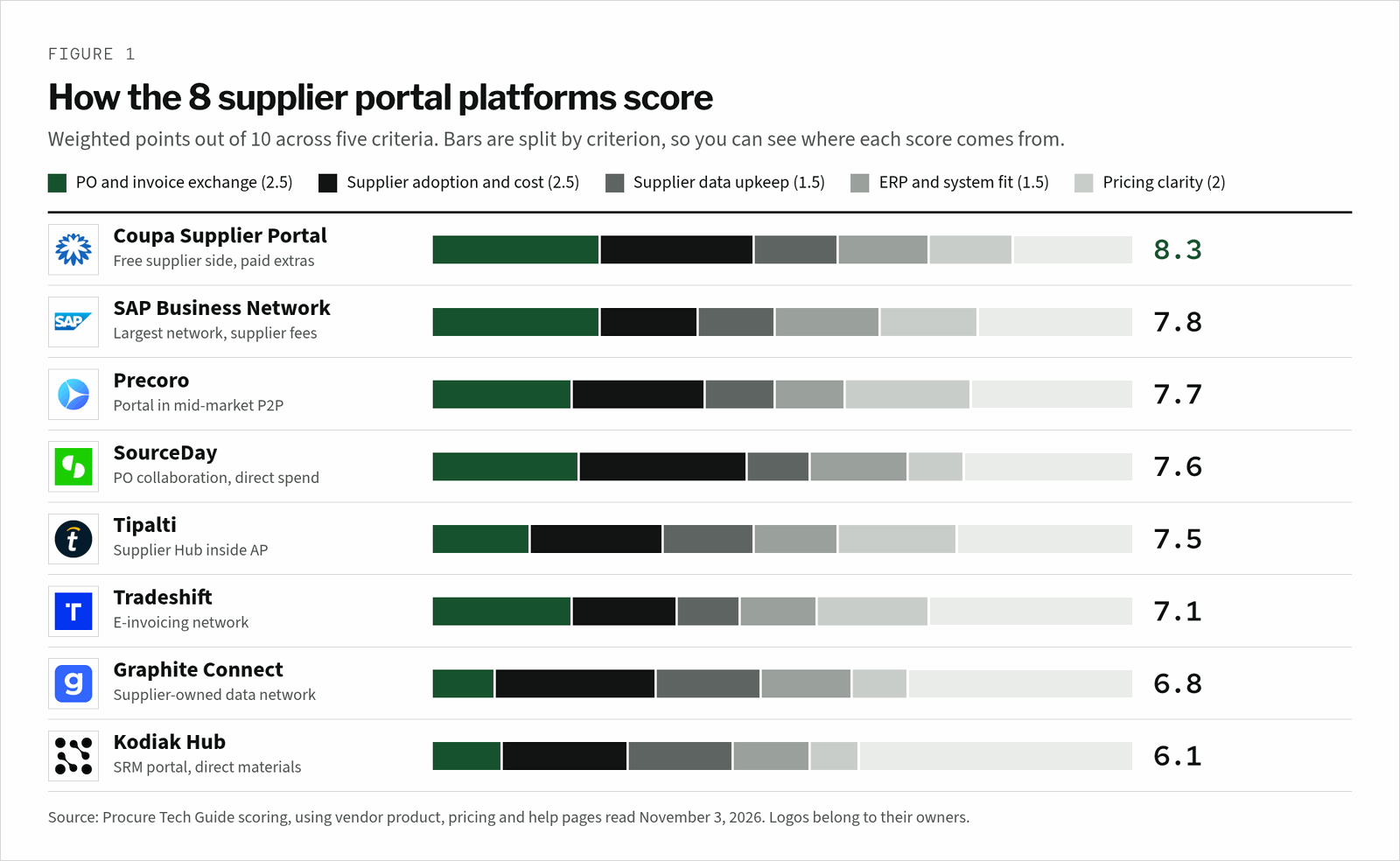
Read the bars by colour, not just the total. SAP loses points on supplier cost, because busy suppliers pay fees. SourceDay wins on adoption but publishes no buyer price. A tenth of a point is not a reason to pick one platform over another.
| Criterion | Weight | What earns points |
|---|---|---|
| PO and invoice exchange | 2.5 | PO acknowledgment, order changes, ship notices and invoice submission named on vendor pages |
| Supplier adoption and cost | 2.5 | A free supplier side, low-effort options like email, and no fees that push suppliers away |
| Supplier data upkeep | 1.5 | Suppliers maintain their own profile, bank, tax and document details |
| ERP and system fit | 1.5 | Stated ERP connectors, APIs or EDI, and two-way sync |
| Pricing clarity | 2 | Published buyer or supplier prices, or a clear pricing basis |
What Can Suppliers Do in Each Portal?
Coupa and SAP Business Network state the widest range of supplier jobs, from PO acknowledgment to catalogs and sourcing events. Precoro covers invoices, RFPs and bank details. SourceDay goes deep on PO confirmations and dates. Tipalti and Graphite focus on supplier details and payment.
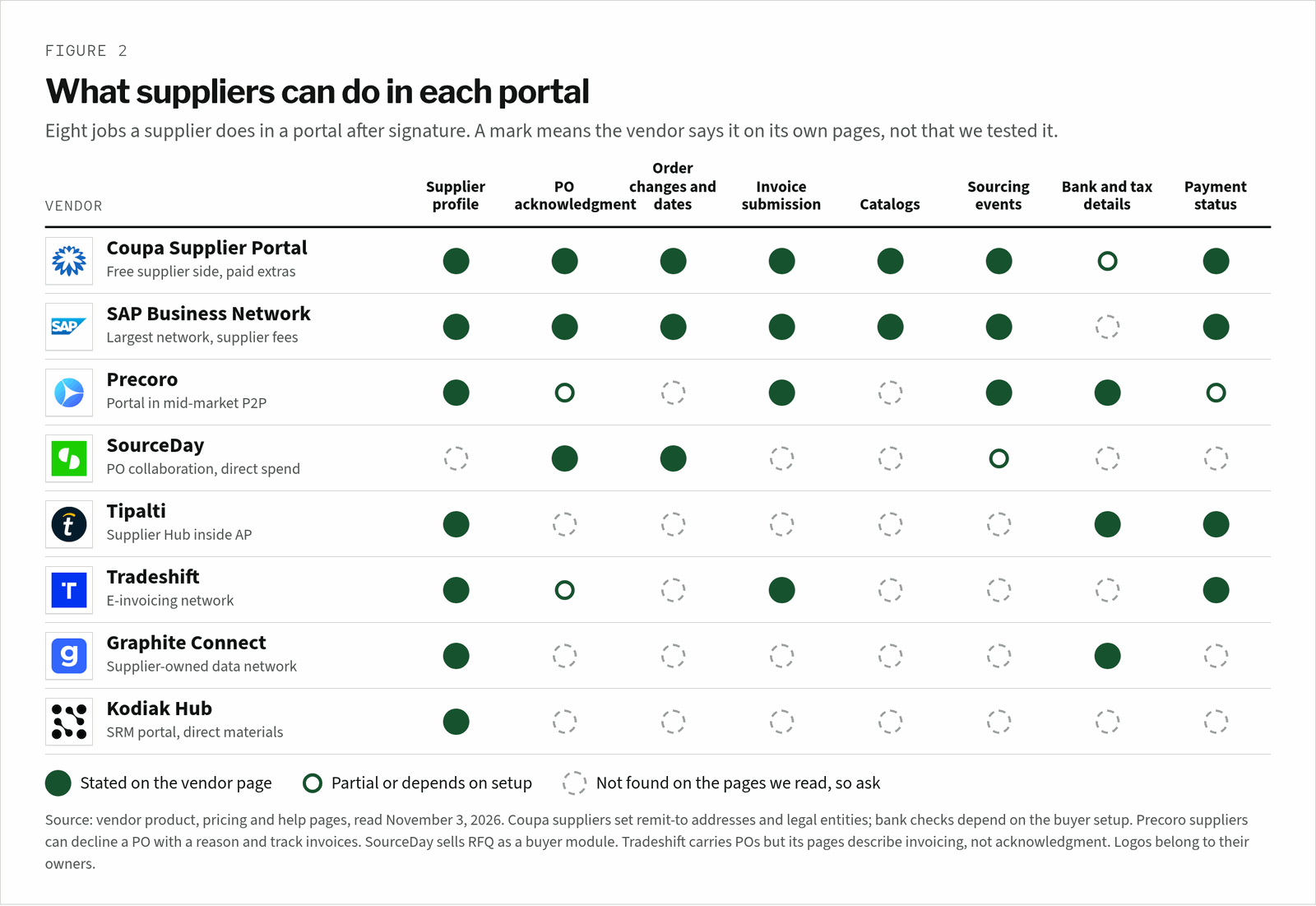
A dashed circle is a demo question, not a verdict. The feature may sit on a page we did not read, or in a module you would buy separately. Ask each vendor to show it live with one of your suppliers.
Who Pays: Supplier Fees and Buyer Prices
Supplier fees decide adoption. A supplier asked to pay to invoice you may push back, raise prices or keep emailing PDFs. Three of the eight platforms publish supplier fees. Two publish a buyer price. Check both sides before you invite a single supplier.
| Platform | Supplier side | Buyer side | Source |
|---|---|---|---|
| Coupa Supplier Portal | Free Registered tier; optional Verified $549 a year, Premium Support from $499 a year, Advanced $4,800 a year | Quote based | Coupa supplier offerings |
| SAP Business Network | Standard account free with unlimited documents; Enterprise account fees once a supplier passes 5 documents and $50,000 with one customer | Quote based (SAP Ariba) | SAP Ariba support note |
| Tradeshift | Free up to 30 invoices or credit notes a quarter; then $0.80, $0.60 or $0.30 per invoice by volume | Quote based | Tradeshift seller pricing |
| Precoro | No supplier fee named on the pages we read | Automation plan from $999 a month, billed annually, includes the Supplier Portal | Precoro pricing |
| Tipalti | No supplier fee named on the pages we read | Accounts Payable from $99 a month with a self-service supplier portal, plus transaction fees | Tipalti pricing |
| SourceDay | Free for suppliers; EDI and enterprise API cost extra | Quote based | SourceDay buyers page |
| Graphite Connect | Free for suppliers, with unlimited users | Quote based | Graphite FAQ |
| Kodiak Hub | No supplier fee named on the pages we read | Quote based | Kodiak Hub site |
SAP’s Enterprise fees have two parts. The annual subscription runs from $50 (Bronze) to $5,500 (Platinum), set by yearly document count. The transaction fee is 0.155% of transacted value, or 0.35% with service sheets. It is capped at $20,000 per customer relationship a year, per the SAP Learning course on supplier fees.
Once one relationship is chargeable, SAP charges across all of that supplier’s customers. Tell your suppliers this before go-live, in writing. For the buyer side of the same choice, read our Coupa vs SAP Ariba comparison.
What the Record Holds
A supplier portal only helps if each record has an owner. Ask each vendor to show these fields for a real supplier. If nobody owns a field, it goes stale before it becomes a problem anyone notices.
Fields to see in the demo
| Field | Who owns it | Source |
|---|---|---|
| Legal name, address and contacts | Supplier | Supplier profile in the portal |
| Remit-to bank details and change history | Supplier, approved by AP | Portal, with a second approver on changes |
| Tax forms such as W-9 or W-8 | Supplier, checked by AP | Portal upload or tax form flow |
| PO acknowledgment and promised date | Supplier | Portal, email action or EDI |
| Change order response | Supplier, reviewed by the buyer | Portal, synced to the ERP |
| Invoice and its PO match status | Supplier sends, AP approves | Portal invoice or e-invoice |
| Payment status and remittance | AP | Payment system, shown in the portal |
| Certificates and expiry dates | Supplier, tracked by procurement | Portal documents or SRM module |
If the portal’s main job is the PO itself, see our purchase order software ranking.
The 8 Best Supplier Portal Software Platforms, Reviewed
Each review covers what suppliers can do, what it costs them, and what we could not confirm. Every claim links to the vendor page where we read it. Screenshots show each vendor’s own page, with the relevant part outlined in red.
1. Coupa Supplier Portal
Coupa’s supplier documentation calls the portal a free tool for suppliers. Its menu covers orders, service sheets, ship notices, invoices, catalogs and payments. Its invoicing guide says suppliers can create invoices straight from POs for free.
Its PO guide shows suppliers acknowledging a PO, adding tracking and creating a credit note. Suppliers can also acknowledge a PO or turn it into an invoice from the PO email. Coupa’s supplier offerings page lists a free Registered tier, Verified at $549 a year and Advanced at $4,800 a year. Our Coupa pricing guide covers the buyer side. For Tier 2 diversity reports in supplier portals such as Coupa’s, see our supplier diversity software ranking.
Strengths
- Free supplier tier covers the core jobs
- Act on POs from email
- Widest set of stated supplier jobs
Watch-outs
- Buyer licence is quote based
- Paid supplier extras can confuse suppliers about what is free
2. SAP Business Network
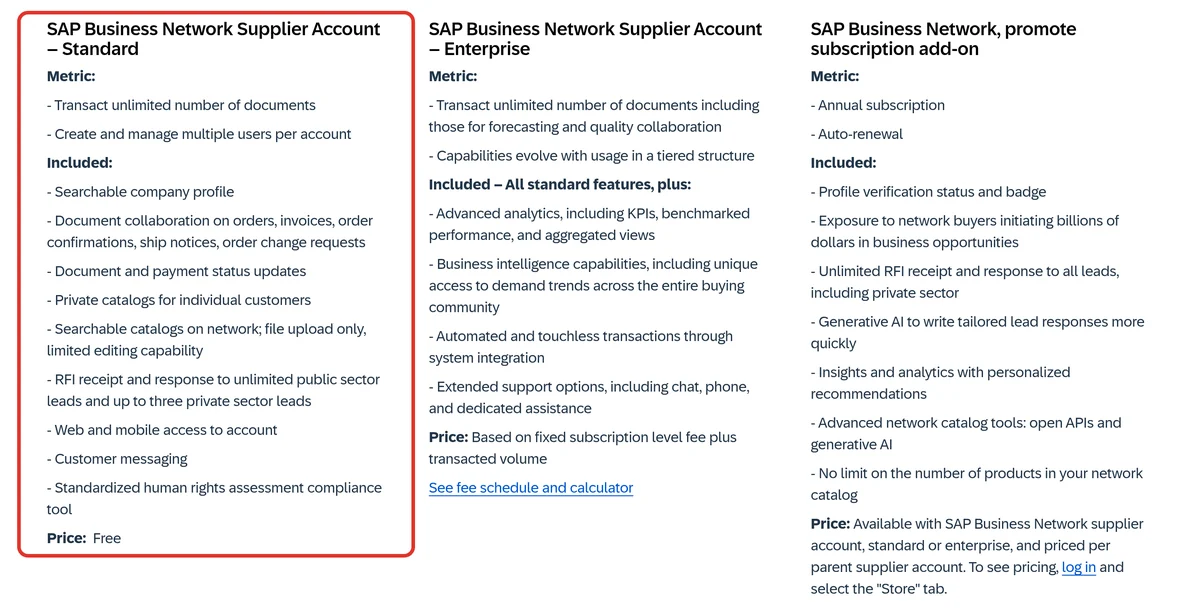
SAP’s supplier pricing page lists the Standard account as free, with unlimited documents. Suppliers collaborate on orders, invoices, order confirmations, ship notices and order change requests. They also get payment status, private catalogs and responses to up to three private sector leads.
The Enterprise account adds analytics and ERP integration, but it carries fees. A supplier becomes chargeable after 5 documents and $50,000 with one customer in a rolling 12 months, per SAP Ariba support. SAP’s learning course says over six million companies use the network, a vendor figure.
Strengths
- Suppliers may already be on the network
- Free Standard account with unlimited documents
- Published supplier fee schedule
Watch-outs
- Busy suppliers pay on every customer once one relationship is chargeable
- Bank and tax details not named on the pages we read
3. Precoro
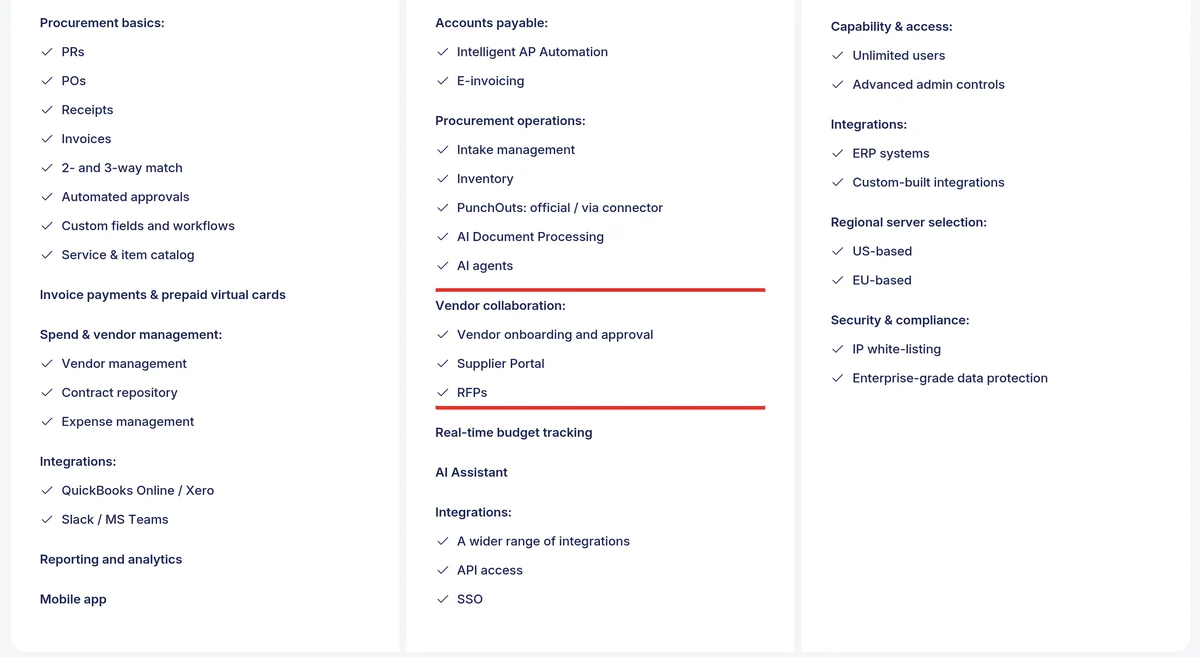
Precoro’s pricing page puts the Supplier Portal in the Automation plan, from $999 a month billed annually. The Core plan, from $499 a month, does not include it. Its help article says the portal is available at no extra cost on Automation.
Suppliers join by invitation, then view POs, send invoices, reply to RFPs and chat about orders. Its supplier guide shows suppliers adding banking details and W-9 forms, and declining a PO with a reason. Data syncs in real time. For Precoro against a close rival, see our Procurify vs Precoro comparison.
Strengths
- Published price that includes the portal
- Suppliers keep bank and tax details current
- RFPs in the same portal
Watch-outs
- Change orders and catalogs not named for suppliers
- Only on the Automation plan and above
4. SourceDay
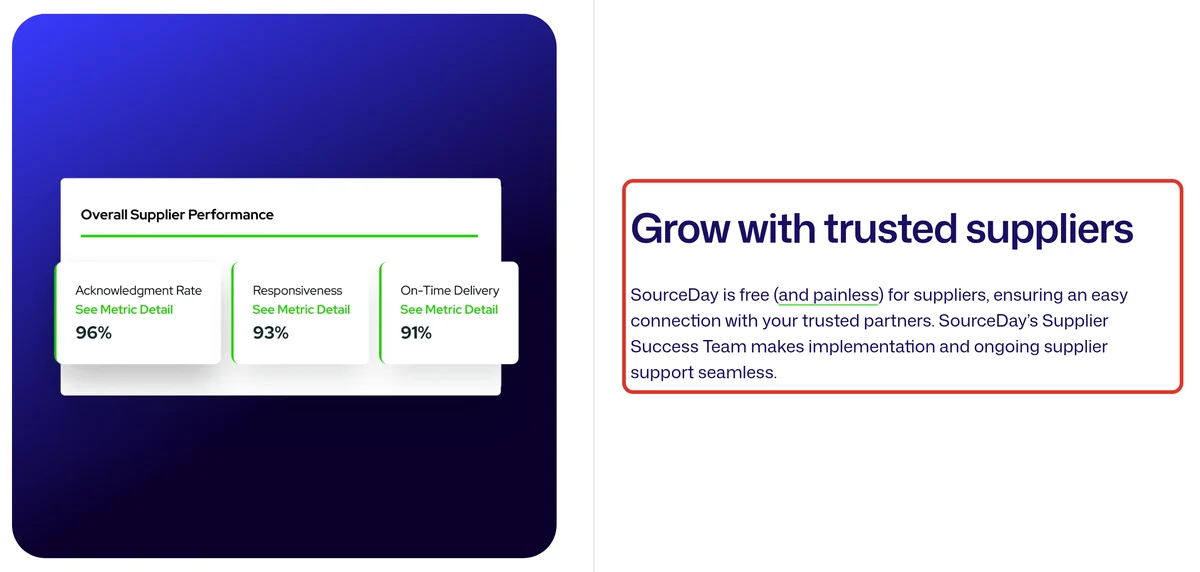
SourceDay’s supplier portal page focuses on open POs. Suppliers review new POs, confirm them, accept or reject change orders and update delivery dates. Every update syncs with your ERP, so planning runs on confirmed dates. AI agents follow up on missing acknowledgments.
Its buyers page says SourceDay is free for suppliers, and its scorecard tracks price variance, on-time delivery, quality and responsiveness. Its help center lists interactive PO emails, portal access, EDI and an enterprise API, with the last two at extra cost. SourceDay claims 90%+ supplier activation, a vendor figure. For scorecards suppliers can see across every supplier, compare our supplier performance management software ranking.
Strengths
- Built for PO confirmation and date changes
- Suppliers can respond from email
- Supplier scorecard built in
Watch-outs
- Invoice submission not named on the pages we read
- No published buyer price
5. Tipalti
Tipalti’s pricing page starts Accounts Payable at $99 a month, with unlimited users and a self-service supplier portal. Transaction fees apply per invoice and payment. Suppliers onboard themselves in 27 languages, per the same page.
Its Supplier Hub guide shows suppliers entering contact details, choosing a payment method and submitting tax forms. They can then track the status of their invoices and payments and see the history. Tipalti says a new Supplier Hub experience is rolling out during 2026.
Strengths
- Published starting price
- Tax forms and payment method in one flow
- Clear payment status for suppliers
Watch-outs
- No PO acknowledgment or order changes named
- Built for paying suppliers, not ordering from them
6. Tradeshift
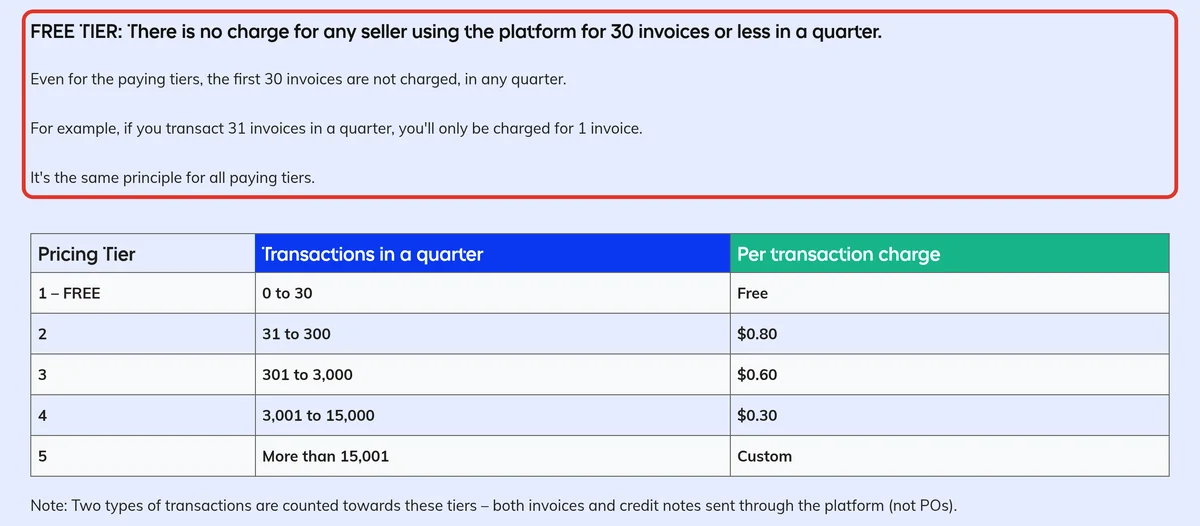
Tradeshift’s seller pricing page charges nothing for 30 invoices or fewer a quarter. Above that, sellers pay $0.80, $0.60 or $0.30 per invoice by volume, billed quarterly. Invoices and credit notes count, but POs do not. The first 30 invoices are never charged.
Its seller page says suppliers can track every invoice until it is paid. It also claims compliance coverage in 70 countries. ERP integration upkeep is offered at $149 a quarter. Busy suppliers will pay, so warn them before you invite them.
Strengths
- Strong e-invoicing and tax compliance
- Invoice status until payment
- Published seller fees
Watch-outs
- Suppliers past 30 invoices a quarter pay
- PO acknowledgment not described on the pages we read
7. Graphite Connect

Graphite’s supplier page says the network is completely free for suppliers. A supplier keeps one profile and shares it with each customer, so it skips questions it already answered. Its buyer FAQ says suppliers can add as many users as they need. Teams that want similar checks with a published price can start with our Graphite Connect alternatives roundup.
Suppliers update their own bank and tax details, which the FAQ says lowers fraud risk. Onboarding can finish within 24 hours when no long surveys apply. Its integrations page names 50+ ERP integrations through its API. Graphite does not handle POs or invoices. It also appears in our supplier onboarding software ranking. We also compare it with HICX and Ivalua in our Graphite Connect vs HICX vs Ivalua breakdown.
Strengths
- Free for suppliers with unlimited users
- Supplier-owned bank and tax data
- Reuses answers across customers
Watch-outs
- No PO, invoice or payment status features
- No published buyer price
8. Kodiak Hub
Kodiak Hub’s sign(UP) post describes supplier self-registration forms you send to suppliers or embed on your website. Suppliers submit their offerings, certificates and documents, which land on a supplier scorecard. To keep those documents current, see our supplier compliance management software ranking. A separate sign(ON) tool handles e-signing with a Docusign integration.
Its onboarding page maps suppliers across 15 business and sustainability areas, such as quality and labor rights. It quotes HL Display cutting self-assessment time from 8 to 10 months to 3 weeks, a customer figure. Kodiak Hub does not handle POs or invoices.
Strengths
- Embeddable self-registration
- Assessments and scorecards for direct materials
- E-signing built in
Watch-outs
- No PO, invoice or payment features
- No published price
After Signature: The First 30 Days
Run this list in every supplier portal software demo, then again in your first month live. Use three of your own suppliers: one large, one small and one overseas. If a step needs a workaround, it becomes manual work later. Get each answer in writing, with who owns it.
- Invites: each supplier gets an invite, and you can see who has not joined.
- Fees: every supplier knows in writing whether it will ever pay to use the portal.
- No-login path: small suppliers can confirm a PO or send an invoice from email.
- Acknowledgment: a PO shows as confirmed, with a promised date, in your ERP.
- Changes: a change order reaches the supplier, and its reply updates the ERP.
- Invoices: an invoice sent through the portal matches its PO without re-keying.
- Bank changes: a new remit-to account needs a second approver before payment.
- Status: suppliers see payment status, so AP gets fewer “where is my money” calls.
Red Flags in a Demo
- The demo uses a sample supplier and none of yours.
- Nobody can say what your suppliers will pay, or when fees start.
- The portal needs a login for every action, even for a one-off supplier.
- Supplier adoption is “high” but nobody shows how it was measured.
- Bank details can change without a second person approving.
- ERP sync is one-way, so supplier dates never reach planning.
Which Supplier Portal Software Should You Choose?
Choose supplier portal software by what suppliers must do, and what they will pay. Coupa leads at 8.3 with a free supplier side. SAP Business Network suits SAP buyers. Precoro has the best listed price. SourceDay fits direct spend, and Tipalti fits teams focused on payment.
The verdict
- Choose Coupa Supplier Portal if you want suppliers on a free portal for orders, invoices and payments.
- Choose SAP Business Network if you run SAP Ariba and your suppliers already have accounts.
- Choose Precoro if you want a portal inside procure-to-pay at a listed price.
- Choose SourceDay if late or unconfirmed POs are your biggest problem.
- Choose Tipalti if the portal exists to collect tax forms and pay suppliers.
- Choose Tradeshift if you need e-invoices from many suppliers across countries.
- Choose Graphite Connect if bad supplier data is the failure you most need to fix.
- Choose Kodiak Hub if you need self-registration and assessments for direct suppliers.
More guides sit in our supplier management hub. For the wider suite choice, see our procure-to-pay software ranking. For the supplier record behind the portal, see our best supplier management software and vendor management software rankings.
Frequently Asked Questions
What is the best supplier portal software?
Coupa Supplier Portal is the best supplier portal software for most buyers, scoring 8.3 out of 10 in our ranking. Suppliers use it free for POs, invoices, catalogs and payments. SAP Business Network (7.8) and Precoro (7.7) follow.
What is supplier portal software?
Supplier portal software is a web portal where suppliers work with your procurement system. Suppliers confirm purchase orders, send invoices, update their profile and bank details, and check payment status. It replaces email chains and manual entry by AP.
Do suppliers pay to use supplier portals?
Sometimes. Coupa, SourceDay and Graphite Connect are free for suppliers. SAP Business Network charges Enterprise accounts once a supplier passes 5 documents and $50,000 with one customer. Tradeshift charges sellers above 30 invoices a quarter. Check before you invite suppliers.
How much does supplier portal software cost?
Buyer prices vary. Tipalti Accounts Payable starts at $99 a month with a supplier portal, plus transaction fees. Precoro includes its Supplier Portal in the Automation plan from $999 a month. Coupa, SAP, SourceDay, Graphite and Kodiak Hub quote each deal.
What is the difference between a supplier portal and supplier management software?
A supplier portal is where suppliers do work with you, such as confirming orders and sending invoices. Supplier management software is the buyer’s tool for onboarding, risk, performance and contracts. Many platforms include a portal, but some portals do not manage suppliers.
Can small suppliers use a portal without logging in?
Yes, on some platforms. Coupa lets suppliers act on POs from email. SourceDay offers interactive PO emails with no login. Precoro email links sign suppliers straight in for 48 hours. Ask each vendor to show the email path live.